


ZStack Cloud Platform
Single Server Deployment with Full Features, Free for One Year

Comprehensive product documentation and tools

Upholding the value of Customer First and the mission of Serving Customer, ZStack is dedicated to providing secure and stable services for customers.

To educate ZStack partners and interested individuals about cloud computing and to cultivate cloud computing talent.

ZStack provides innovative cloud infrastructure for ten major industries
Through three major sections, tens of thousands of words, and more than 10 global representative customer ases
As organizations strive to enhance the agility of their IT infrastructure and reduce costs, the demand for evaluating VMware alternatives has become more urgent than ever. VMware’s subscription-based sales model has led to significant cost increases for users. The increased operational costs have prompted many to look for more affordable solutions, where they only pay for what they actually use.
In addition to the financial strain, VMware’s pricing model—especially when comparing VVF vs VCF pricing—has become a crucial point of discussion, with different pricing tiers significantly impacting businesses’ operational budgets.
Along with the rising costs, another major concern for businesses is VMware’s vendor lock-in. VMware’s tightly integrated ecosystem often limits an organization’s flexibility to adopt other technologies or switch platforms without incurring additional costs. This makes it difficult to adopt emerging technologies or move to more agile cloud-native environments. As a result, businesses are looking for alternatives that can offer greater flexibility, allowing them to avoid the restrictions of a single vendor.
VMware’s infrastructure, while once the gold standard for virtualization, is increasingly seen as limited in its ability to scale and integrate with modern IT needs. As businesses move toward cloud-native applications, containerization, and hybrid IT environments, VMware’s traditional architecture has become cumbersome and less compatible with new technologies. The growing demand for cloud scalability and container-based solutions means that companies need a more agile, flexible, and future-proof infrastructure to stay competitive.
With these challenges in mind, many organizations are beginning to experience a VMware Exodus—a shift away from VMware in favor of more flexible and cost-effective alternatives. The rise of VMware refugees moving to newer platforms reflects a growing dissatisfaction with the cost, complexity, and rigidity of VMware’s offerings. These businesses are seeking solutions that are not only more affordable but also more adaptable to their rapidly changing needs.
In Reddit communities, discussions about the price hikes caused by VMware licensing changes have kept the topic of migrating away from VMware highly relevant. This reflects a real and urgent message to the public: migrating from VMware to other platforms has become an inevitable decision.
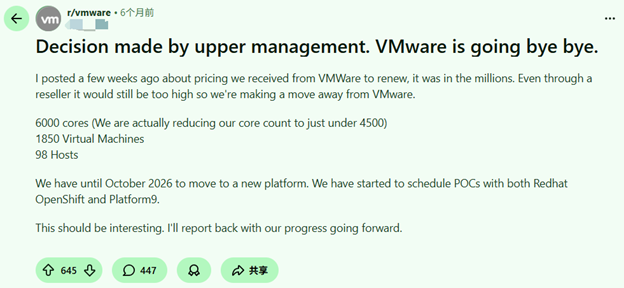
(From posts on Reddit about abandoning VMware)
The choice to VMware migrate demands serious thought. Still, gains usually top the obstacles. Start this path by grasping your firm’s present VMware arrangement. Pinpoint vital tasks and programs, too. This review shapes the VMware Migration Path. It makes sure the switch matches the company and tech targets.
A thorough check of your VMware framework matters a lot before you move. Main items to review:
Which VMware products and services (vSphere, vSAN, etc.) drive your routine tasks?
What financial effects come from sticking with VMware? Especially paying for vSAN I don’t use?
How closely does VMware tie into your current IT network?
Knowing these links helps you choose smartly. You decide which tasks suit a shift. You also spot which VMware elements your work needs.
After you know your VMware setup, select a solid alternative. Various picks exist, such as:
Virtualization-only solutions: Like KVM, and Hyper-V, etc.
Cloud platforms: They bring growth and ease. This lets firms leave on-site systems behind.
Hybrid cloud solutions: These mix public cloud and private bases.
Container Service Platform: A Container Cloud Platform for Cloud-Native Architectures
Review each based on price, ease, growth, and match with your setup.
VMware Migration Path calls for good tools to move. V2V (Virtual-to-Virtual) tools often shift tasks from VMware to the fresh base. Cloud plans add easy links and growth as well. The Broadcom bundling strategy and VMware’s new subscription style add extra hurdles to choices. This makes checking VMs alternatives quite attractive.
The virtualization world has widened. It gives many choices to VMware. Match your setup’s details, and the firm aims to pick the best one for you.
Tools like KVM (Kernel-based Virtual Machine) bring cheap, expandable, and adjustable paths. Firms eyeing a break from VMware favor them. These help dodge vendor binds. They let groups hold the reins on their systems. Representative enterprises include ZStack and others.
Paid picks, such as Hyper-V, join tightly with Microsoft items. This suits groups in Microsoft worlds already. They deliver firm results and work for big or small outfits.
HCI stands out as a common pick for groups after straightforwardness and room to shift. It pulls compute, storage, and network into one frame. This trims the tangle of classic data hubs. The choice aids firms swapping VMware for a tighter tool. It eases oversight and boosts how resources are used.
Public cloud firms like AWS, Google Cloud, and Microsoft Azure are experiencing strong growth over VMware. These bases let you expand when you need. They cut the chore of on-site hardware care. A cloud shift can trim daily costs, too. It opens more ways to assign resources.
Firms head to cloud-native programs. So, containerization draws more fans. Containers use Kubernetes. They give a slim, movable stand-in for standard virtualization. Containers let firms run programs steadily across spots. This holds on-site or in the cloud alike.
To migrate VMware, plan with care and carry it out well. These steps aid a clean change:
Prior to moving, run a full review of your VMware arrangement. Note which tasks prove vital. See which fits the new base. This orders the move. It guards key services from hitches in the switch.
A Proof of Concept (PoC) marks a vital step to check the move’s viability. It helps gauge the new base’s fit with your setup. You test output and catch snags before the full dive. In PoC, try moving tools. Confirm the new base’s traits, too.
With PoC success, go to the true move. It includes:
Break the move into phases. This limits hits to firm work. The step method lets you track it. You fix problems fast.
Post-move, steady aid keeps the new base humming. It covers issue fixes, output checks, and tweaks for top work. Plan routine updates and care. They hold the system safe and sharp.
After the move wraps, firms turn to ongoing tasks and fine points. Consider these:
To lock in your IT frame for tomorrow, select a base that grows with your firm. ZStack delivers bendy growth. It lets you add parts simply. No fears of output blocks.
The new base must hit safety marks, and rule fits. The system shields from outer risks and rule slips.
A prime drive to VMware migrate is cost cuts. Its sharp cost aids show resource use. They curb needless outlays.
ZStack serves as a fresh AI-based goods maker. It supplies full fixes for the VMware Migration Path. ZStack hands firms a clean, safe, money-saving stand-in to VMware. This secures easy shifts and lasting gains.
ZStack heads Virtualization alternatives and cloud oversight. It ties well with the current frames. It has straightforwardness and auto work. Thus, ZStack rises as the top choice for firms. They aim to de-VMware spots and shift to updated, expandable systems.
More than 4,000 companies across over 30 countries and regions are already using ZStack, including more than 1,000 enterprise customers that have adopted ZStack solutions as a replacement for VMware. The ZStack ZSphere virtualization platform has been recognized as a Representative Vendor in Gartner’s Market Guide for Server Virtualization Platforms.
A: Migration can be done using tools like ZStack’s V2V migration services, ensuring a seamless transition from VMware to your new platform without disrupting operations.
A: ZStack provides a cost-effective, scalable, and secure alternative to VMware, offering built-in automation, ease of management, and strong compatibility with existing systems.
A: Start by assessing the dependencies of your VMware environment, including which features are critical for your business. Then, evaluate alternatives based on your infrastructure needs, cost considerations, and scalability requirements.
A: ZStack offers solutions including the ZMigrate migration tool, ensuring a smooth transition from VMware-based systems to the ZStack cloud platform, providing flexibility, security, and ease of management.
A: ZStack incorporates multi-layered security features, including encryption and real-time monitoring, to safeguard your data during the migration process and ensure compliance.
 2025-10-29
2025-11-26
2025-10-29
2025-11-26
 Featured
Virtualization
2024-12-12
Featured
Virtualization
2024-12-12


