
When preparing to migrate virtual machines and workloads from a VMware environment to ZStack ZVF, there is a long checklist to confirm:
Can the maintenance window accommodate the migration?
Is the VMware source platform reachable?
Do the snapshots and disk states of the VMs to be migrated meet the requirements? Are the migration components ready?
If any of these go unchecked, the migration can be blocked by unreachable connections, non-compliant source VM states, or unprepared components — forcing last-minute troubleshooting and disrupting the original migration schedule. For the team responsible for the migration, knowing in advance where the problems are and which prerequisites are not yet in place provides far greater confidence.
ZStack ZVF 1.1 is now officially released, with upgrades and optimizations targeting VMware migration, multi-department resource management, and day-to-day operations. Among them, ZMigrate introduces pre-migration checks and environment readiness validation for VMware-to-ZVF migrations, helping customers prepare more thoroughly and migrate more efficiently and reliably. The centralized management platform ZCenter adds multi-tenancy capabilities, enabling resources to be allocated by organization and requested by users through catalogs. Runtime monitoring and routine operations are also improved, making daily management easier and troubleshooting better grounded in evidence.
01 / VMware Migration
VMware Migration Enhancements: Risk Pre-Checks and Environment Readiness Validation
Real-world VMware environments are often more complex than the migration plan assumes. Connectivity varies across ESXi hosts, VMs may carry leftover snapshots, and the component status of migration gateways can all affect task progress. The later the troubleshooting, the more likely it is to disrupt scheduled work.
ZMigrate now offers pre-migration checks: before starting a migration, it verifies whether the VMware source platform is reachable, whether each ESXi host is available, and whether the snapshots, disks, and NIC configurations of the VMs to be migrated meet the requirements. The check results list all detected issues, allowing operators to address them in advance and reducing repeated troubleshooting during migration.
Migration Precondition Checks: Connectivity, VM State, and Source Platform Availability
The pre-check covers three key areas:
Connectivity:Verifies DNS resolution and HTTPS/NFC port connectivity to detect VMware source platform connection issues early.
VM state compliance: Checks snapshots, CBT (Changed Block Tracking) status, and disk/NIC counts, presenting results as "Pass," "Risk," or "Fail."
Source platform availability: Results are displayed per VMware ESXi host; when checks fail, creation of the source platform or migration task is blocked.
For example, if a source VM has zero NICs, the pre-check marks it as "Fail" and indicates that the migration task cannot be created. Operators can then fix the source-side configuration first, instead of tracing the cause after the task is already underway.
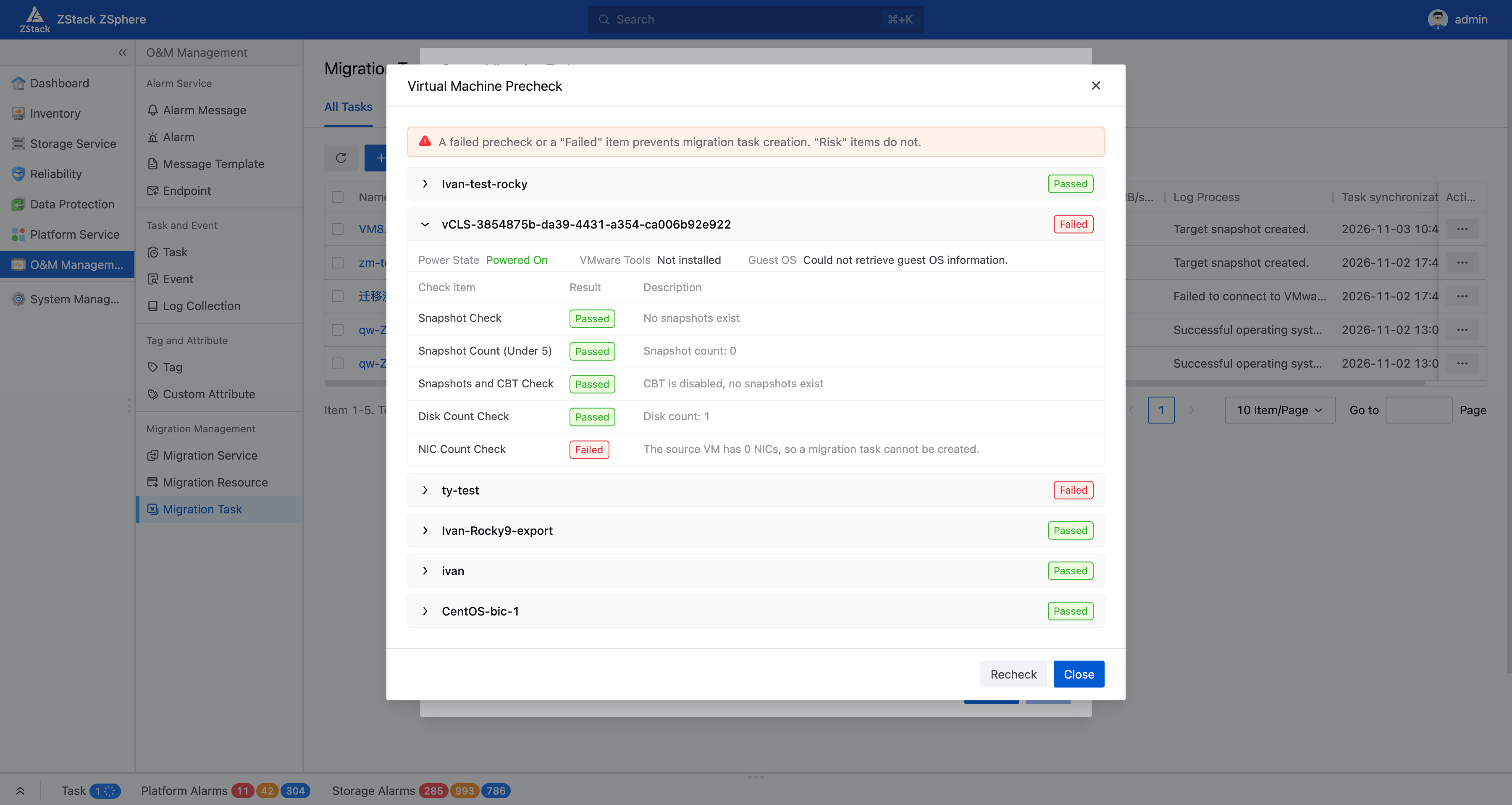
Figure 1: Pre-migration Check Results
Every preparation issue identified in advance is one less known risk carried into the migration. This upgrade is designed to help migration teams eliminate exactly those avoidable, repeatedly disruptive problems that complex environments tend to hide.
VDDK Component Management: Multi-Version Distribution and Readiness Validation
Migrating VMs from VMware requires components such as the VDDK (VMware Virtual Disk Development Kit) to be in place — a deployed migration gateway does not necessarily mean these components are ready. ZVF 1.1 further improves VDDK component management: it supports retaining both Linux versions 6.7.3 and 8.0.3 simultaneously, automatically distributing them to gateways, and displaying upload status along with the list of uploaded components. When an upload fails, you can view the cause and retry.
Gateways without completed VDDK distribution cannot be used to create source platforms or migration tasks.
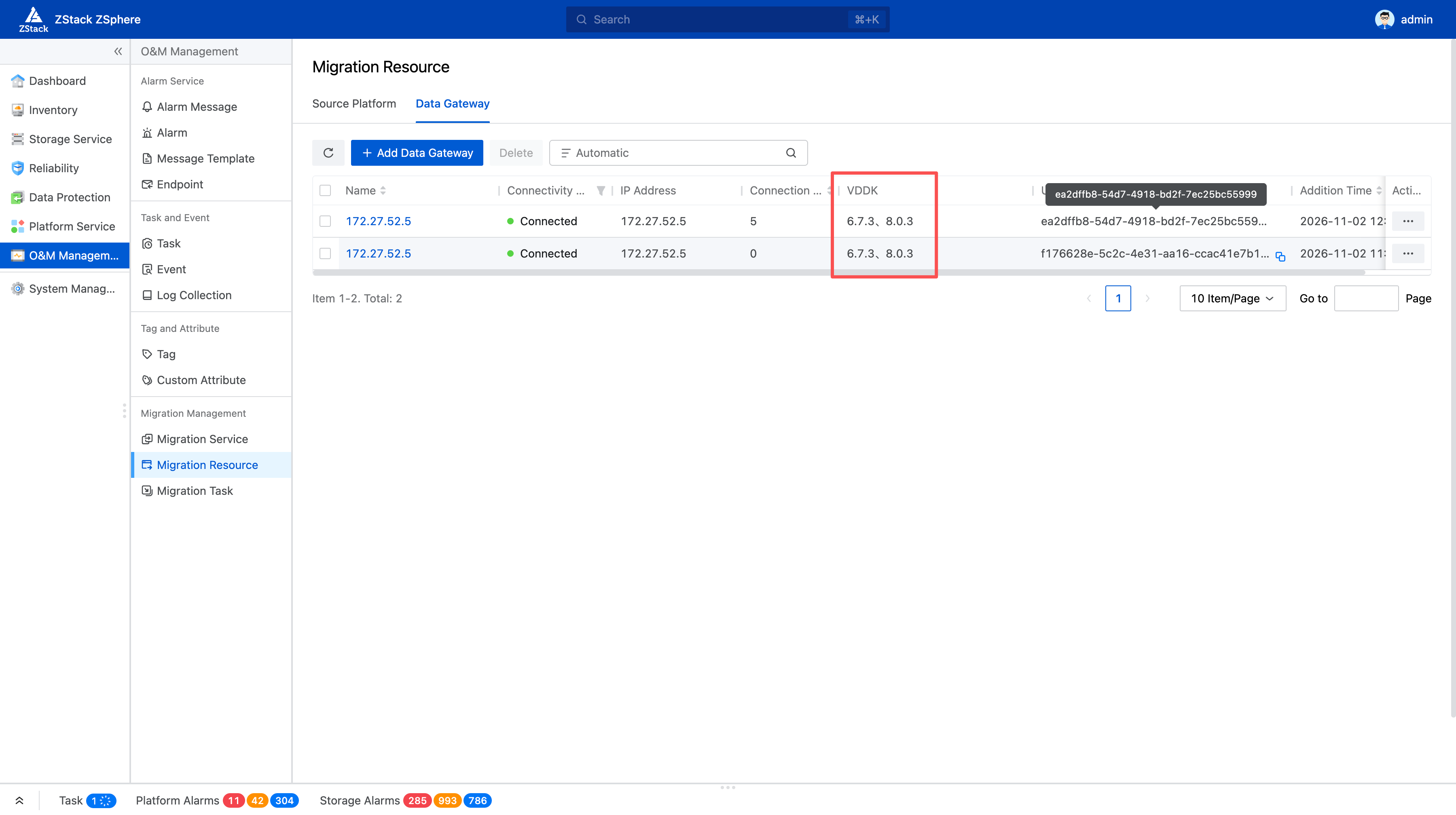
Figure 2: Migration Components and Gateway Status
Migration Resource Management: Snapshot Cleanup and Service Uninstallation
After a migration task completes, the associated snapshots and service resources still need to be managed. You can now view migration snapshots by disk and delete them individually or in batches. Deleting a task also cleans up its associated snapshots, and cleanup is supported whether the cutover succeeds or fails — with a second confirmation required before deletion.
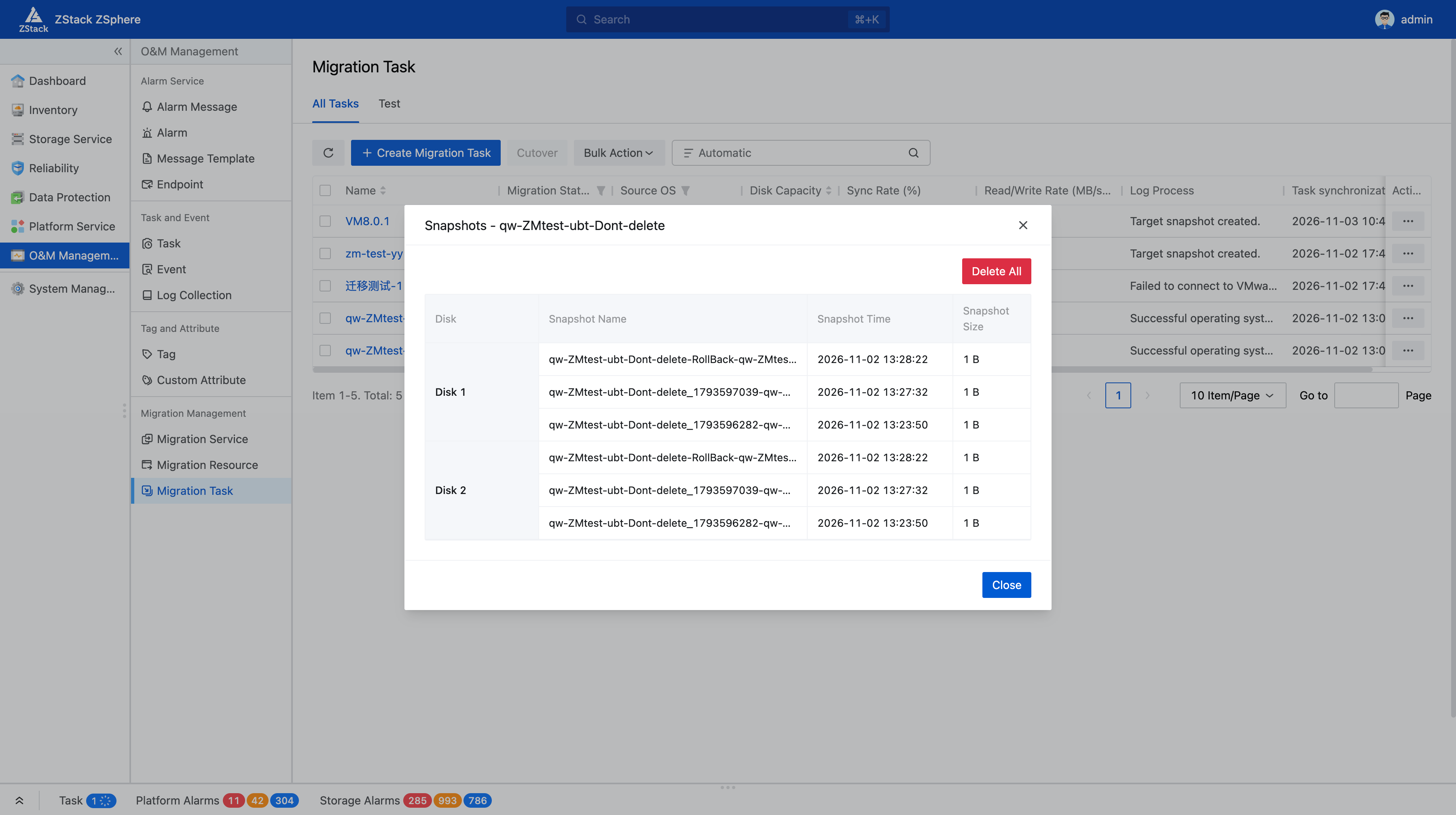
Figure 3: Migration Task Snapshots
When the current round of VMware migration is complete and ZMigrate is no longer needed, you can confirm uninstallation through the interface to centrally clean up gateways, VDDK components, historical task data, and related underlying resources — reducing the manual effort of locating and removing items one by one, and lowering the risk of orphaned resources.
02 / Multi-Tenant Management
Multi-Tenant Management: Organization-Based Authorization with Resource Self-Service
When multiple departments share one virtualization infrastructure, resource management must both serve business needs and define clear usage boundaries: R&D needs test environments, project teams request temporary resources, department heads need visibility into usage, and the platform team must coordinate resource allocation and permission management. If member authorization, configuration confirmation, and resource requests all depend on the platform administrator handling each item individually, repetitive communication consumes enormous effort, and departments struggle to manage their own day-to-day work.
ZCenter introduces an organizational system and a cloud operations center, extending centralized management of multiple ZSphere environments into multi-department collaboration: the platform centrally configures resource pools and authorizations, departments manage themselves within defined scopes and quotas, and employees request resources through a service catalog — bringing standards to resource provisioning and a clear division of management responsibilities.
Organizational Authorization and Resource Quotas: Defining Responsibilities and Usage Boundaries
The platform supports three built-in roles:
Platform administrator: Establishes organizations and maintains resource pools and authorizations.
Organization administrator:Manages authorized organizations and their sub-organizations, maintains members, and handles organizational business.
Regular user: Accesses their available catalogs to request and use authorized resources.
Custom roles are also supported. A user participating in different organizations can hold different identities in each, and an organization administrator's permissions are always confined to the authorized scope.
When allocating resources to a department, two things must be clear: which resources can be used, and how much at most.
Resource pools define the scope: Specify the available compute, storage, and network resources, with cross-cluster selection supported as business needs require. Many-to-many associations can be established between organizations and resource pools.
Organization quotas constrain usage: Configure CPU, memory, and storage quotas; sub-organizations allocate further within the parent organization's quota, preventing shared resources from being over-consumed by any single department.
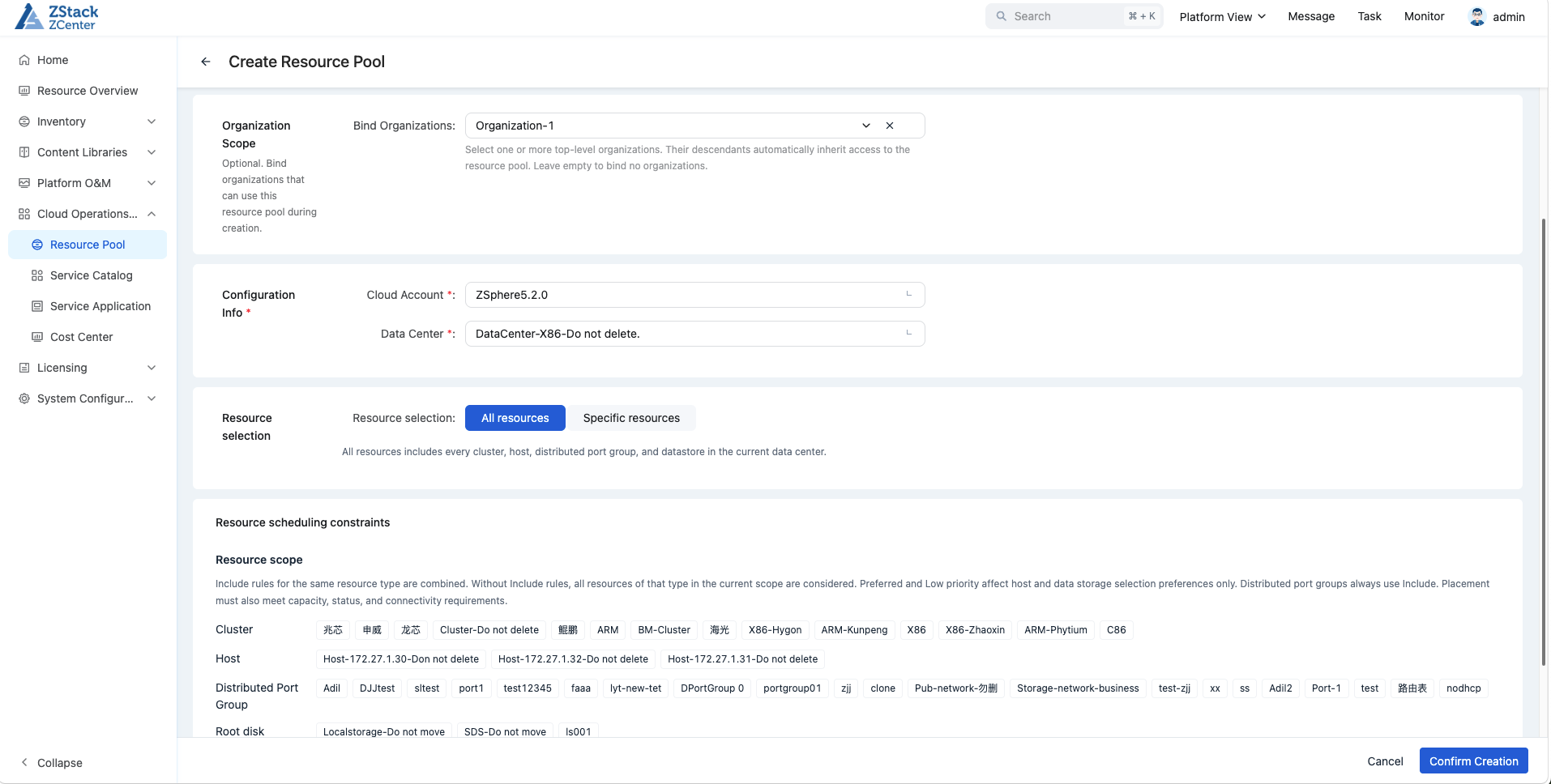
Figure 4: Resource Pools and Organization Associations
Take R&D testing as an example: the platform can authorize a test resource pool to the R&D organization, and the organization administrator then allocates resources to individual projects within the quota. Once the platform team sets the supply rules, departments can handle their routine affairs within clearly defined boundaries.
Service Catalog and Approval: Standardizing Resource Requests and Delivery
Administrators can preset commonly used VM specifications, images, and required parameters as service catalogs, publishing them to organizations with resource pool authorization. Users select a catalog, fill in the necessary information, and submit a request — without needing to choose underlying hosts directly. Requests, approvals, delivery status tracking, and lease-related processes all have a unified entry point.
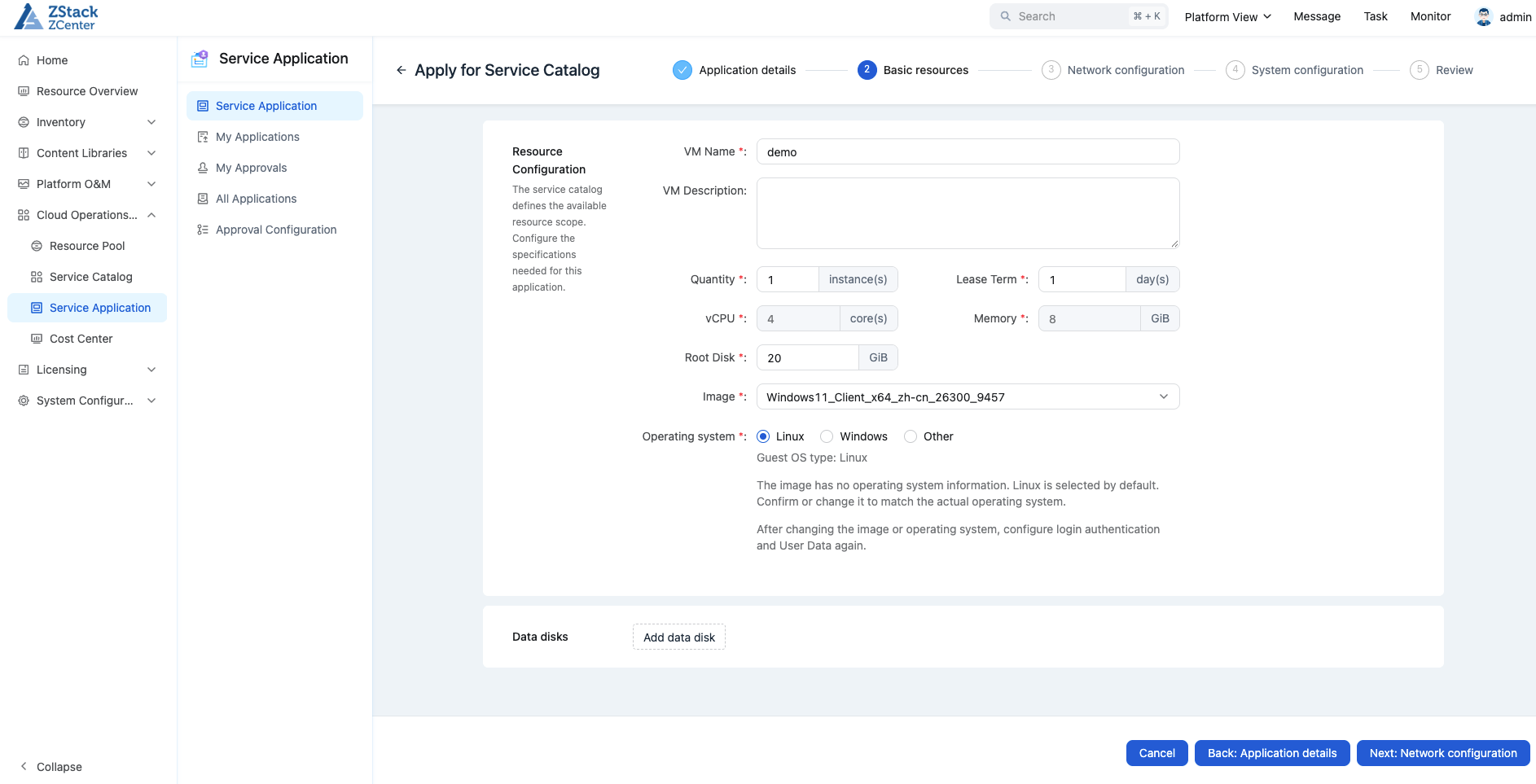
Figure 5: Requesting Resources by Catalog
Resource creation is still subject to approval results, real-time permissions, organization quotas, and underlying resource availability. For users, the request path is clearer; for operations teams, common configurations become reusable and every step leaves a queryable record.
The platform supports request cost display and bill queries by resource ownership and authorization scope, helping enterprises evaluate resource usage costs and conduct department-level cost accounting. Operation auditing retains information about the actual operator when administrators handle business on behalf of others, providing a basis for operation traceability and accountability.
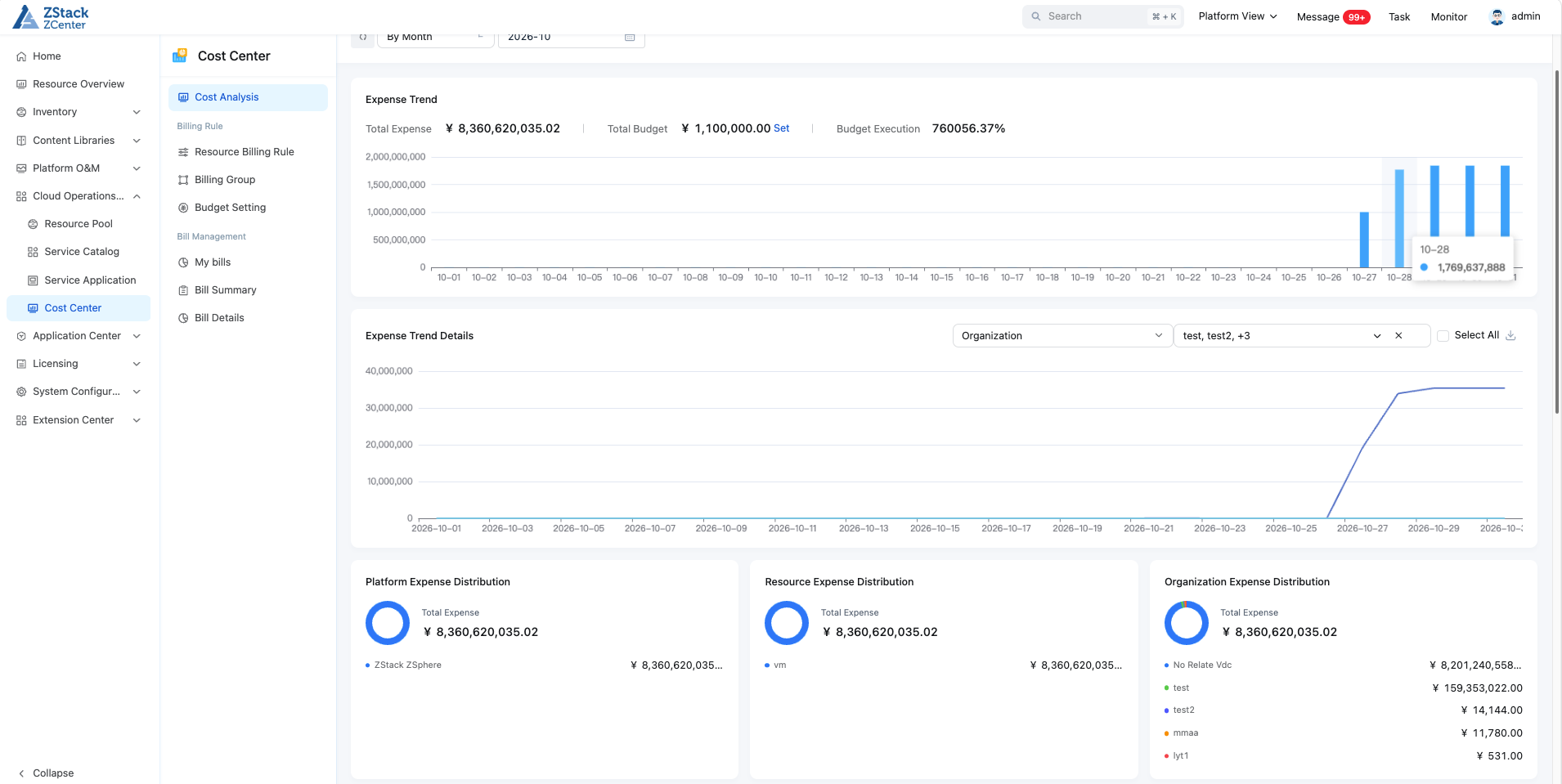
Figure 6: Viewing Resource Costs by Ownership
Departments know what they can request and how much they have used, while the platform team can focus more on supply standards, capacity planning, and critical operations.
03 / Monitoring and Operations
Enhanced Operations Management: Improved Monitoring, Alerting, and Daily O&M
Once workloads are running, troubleshooting still needs evidence when applications slow down: Is it CPU scheduling contention, storage latency, or network packet loss affecting access? Every additional observation dimension provides another clue for narrowing down the problem.
ZSphere adds host and VM monitoring metrics in this release and supports resource-based alerting:
CPU scheduling: New CPU Ready and related scheduling metrics help analyze scheduling contention.
Storage performance: New disk read/write throughput and peak latency metrics let you observe throughput and latency together.
Network transmission: New NIC receive/transmit packet drop metrics help detect transmission anomalies.
Resource alerting: Full support for the new metrics, combining routine observation with anomaly notification.
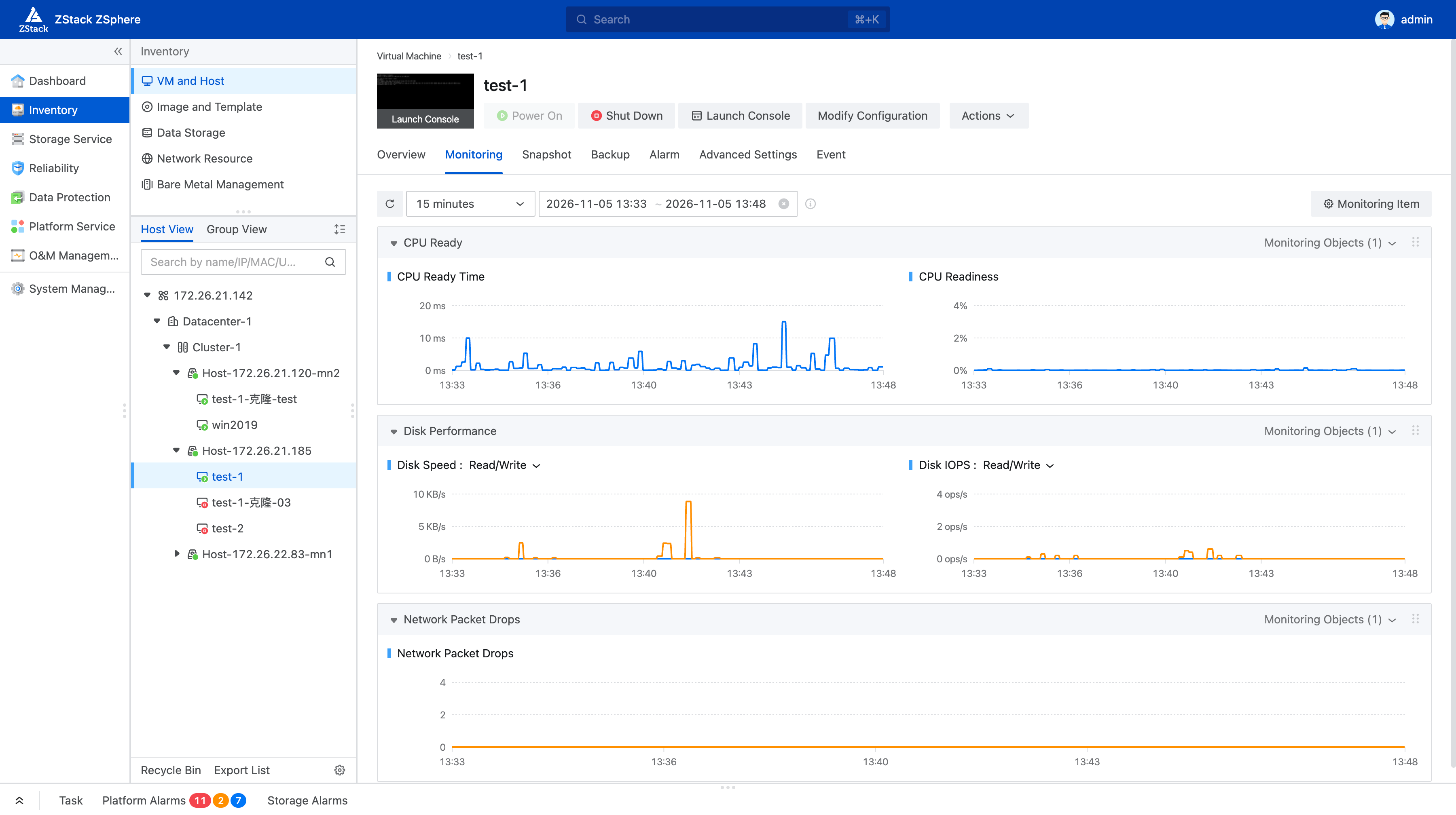
Figure 7: New Runtime Monitoring Metrics
The unglamorous but frequently used operations in daily management have also been enhanced:
On-demand VMtools configuration: The Windows version supports custom installation of ZWatch, QGA, CloudBase-Init, and VirtIO, and allows enabling or disabling the QGA-based VM password setting feature to fit different management needs.
Registering VMs from cloned storage volumes: LUNs cloned from the source platform can be registered after UUID reset; already-registered VMs can also have their UUIDs reset for re-registration, making it easy to reuse existing resources.
Incomplete snapshots visible and manageable: Incomplete snapshots can now be displayed, created, deleted, modified, and queried, filling a gap in routine maintenance.
UI themes to match your preference: Light, dark, and system-following themes are supported — one more option for those who spend long hours in front of the console.
These improvements land in concrete operations: one less round of searching, one more basis for troubleshooting — and a platform that helps people get their work done more easily.
04 / User Experience Program
User Experience Improvement Program: Inviting Users to Shape the Product
Whether a platform is truly usable ultimately comes down to the people who use it every day. How long it takes to find a resource request, whether troubleshooting information is easy to read, whether common operations feel smooth — you experience these details most directly in your daily work.
ZVF 1.1 introduces the User Experience Improvement Program, inviting you to share technical data such as product usage and runtime performance to help us continuously improve the product experience, performance, and stability. Real-world usage data provides valuable reference for optimizing interaction design and understanding usage habits.
Participation is entirely your choice. You can review the Data Collection Statement under "System Management — Experience Improvement Program," join after reading and consenting, and change your settings or withdraw at any time.
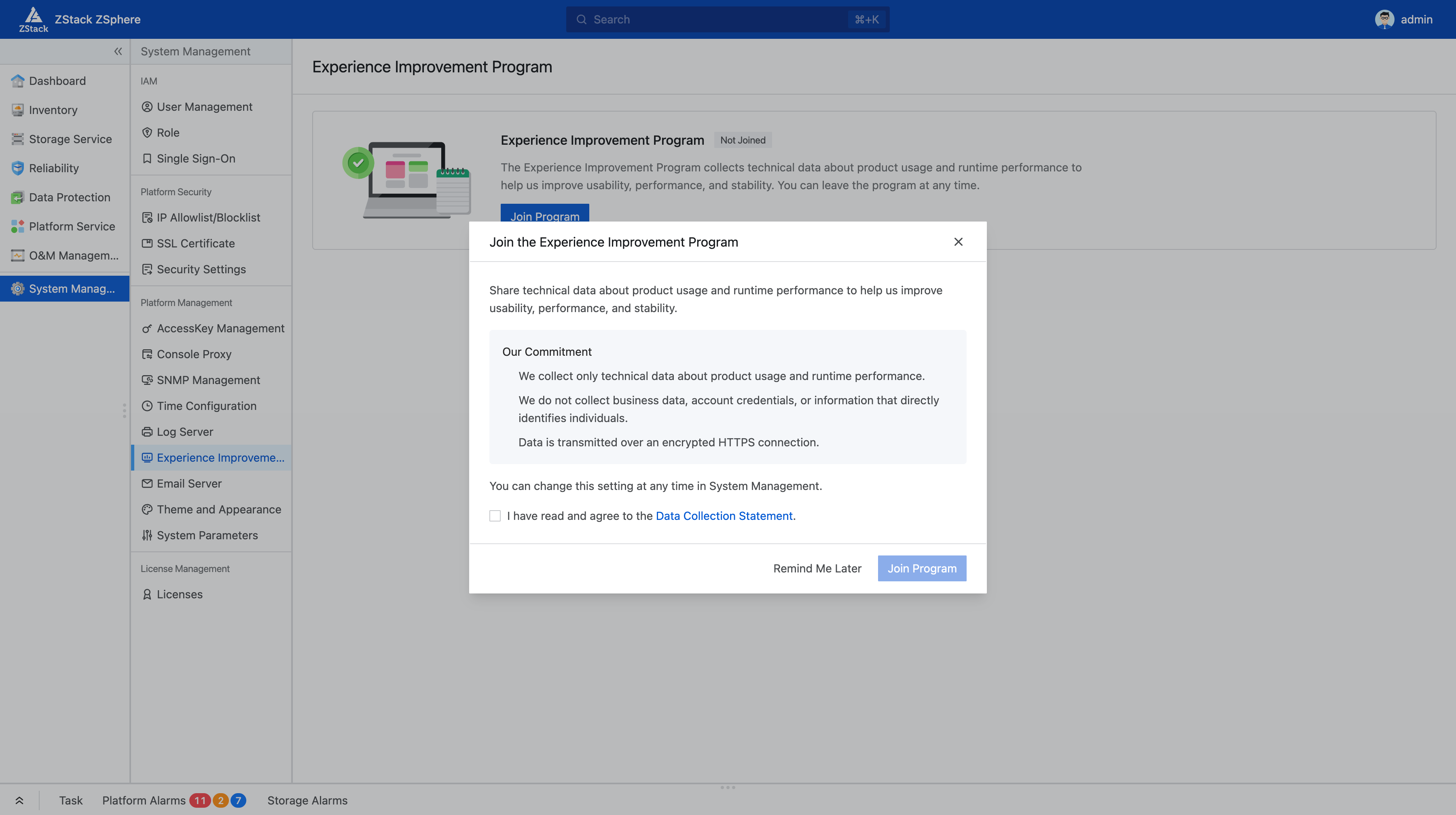
Figure 8: User Experience Upgrade Plan
We warmly invite you to join this program and help make ZVF fit daily work even better. You can also tell us about the specific inconveniences you encounter during migration, resource requests, or routine operations — where you got stuck, what information you'd like to see, which operation still isn't smooth enough. All of these are improvement directions worth serious discussion.
If you are planning a VMware migration, building an enterprise virtualization platform, or looking to solve resource management and operations challenges in your existing environment, feel free to contact us. We'd be glad to explore the ZStack ZVF solution that best fits your business needs and actual environment.