
At 10 p.m., a financial institution has finished collecting the day's business materials. The online model that handles system lookups and clause searches during the day now receives very few requests. Meanwhile, the night-time batch processing job needs to classify these materials and extract fields, all before the next business day begins.
The two workloads' peaks neatly stagger — yet the batch-processing model still can't get the GPUs: the online model's weights remain resident in memory, occupying the entire pool of eight GPUs.
Similar conflicts confront many enterprises that have deployed multiple large models. The business side sees a shortage of GPUs: a new model is waiting to go live, background jobs are queuing, and no assignable GPU pool can be found in the resource inventory. The procurement side sees different numbers: the existing hardware only runs at full capacity during certain windows, and compute utilization still has plenty of headroom.
Both sides are telling the truth. Large-model resources are typically allocated on a long-term, per-deployment basis, while business demand for compute rises and falls. As a result, a GPU pool can sit nearly idle for hours yet still be unavailable to a model that's queuing.
Should the next budget go toward buying more GPUs?
If several workloads genuinely need to run at full capacity in the same window, scaling up is fully justified. But if online Q&A keeps things busy during the day while document processing runs at night, provisioning an eight-GPU pool for each means higher procurement costs — and both pools end up underused for half the day. To get this calculation right, you can't just look at how many GPUs each model needs; you also have to look at how much of the time they need those GPUs simultaneously.
GPUWorks time-sharing lets multiple large models use the same complete GPU pool at different times. Workloads with a clear handover schedule can be set up in advance with timed plans; workloads whose request arrival is unpredictable can hand over based on idle duration, per-turn service time, or priority. The daytime online service keeps exclusive use of its eight GPUs, and the night-time batch job gets those same eight GPUs — with no need to staff someone to stop services and swap models every day.
01 / SHARED GPU RESOURCES
How GPUWorks time-sharing lets multiple models share a single GPU pool
In GPUWorks, administrators can deploy multiple models on the same GPU pool and set a yield policy for each deployment. When another model needs the GPUs, GPUWorks checks the current model's policy to determine when it should release its resources.
For example, DeepSeek, Qwen, and GLM share a pool of eight GPUs. While DeepSeek is using all eight to process requests, Qwen sends a request for the GPUs. Once DeepSeek satisfies its yield condition, it finishes handling its current requests according to preset rules, then enters sleep and releases its memory. Qwen takes over the eight GPUs and resumes service. If GLM is also waiting, Qwen's yield policy determines when the next handover happens.
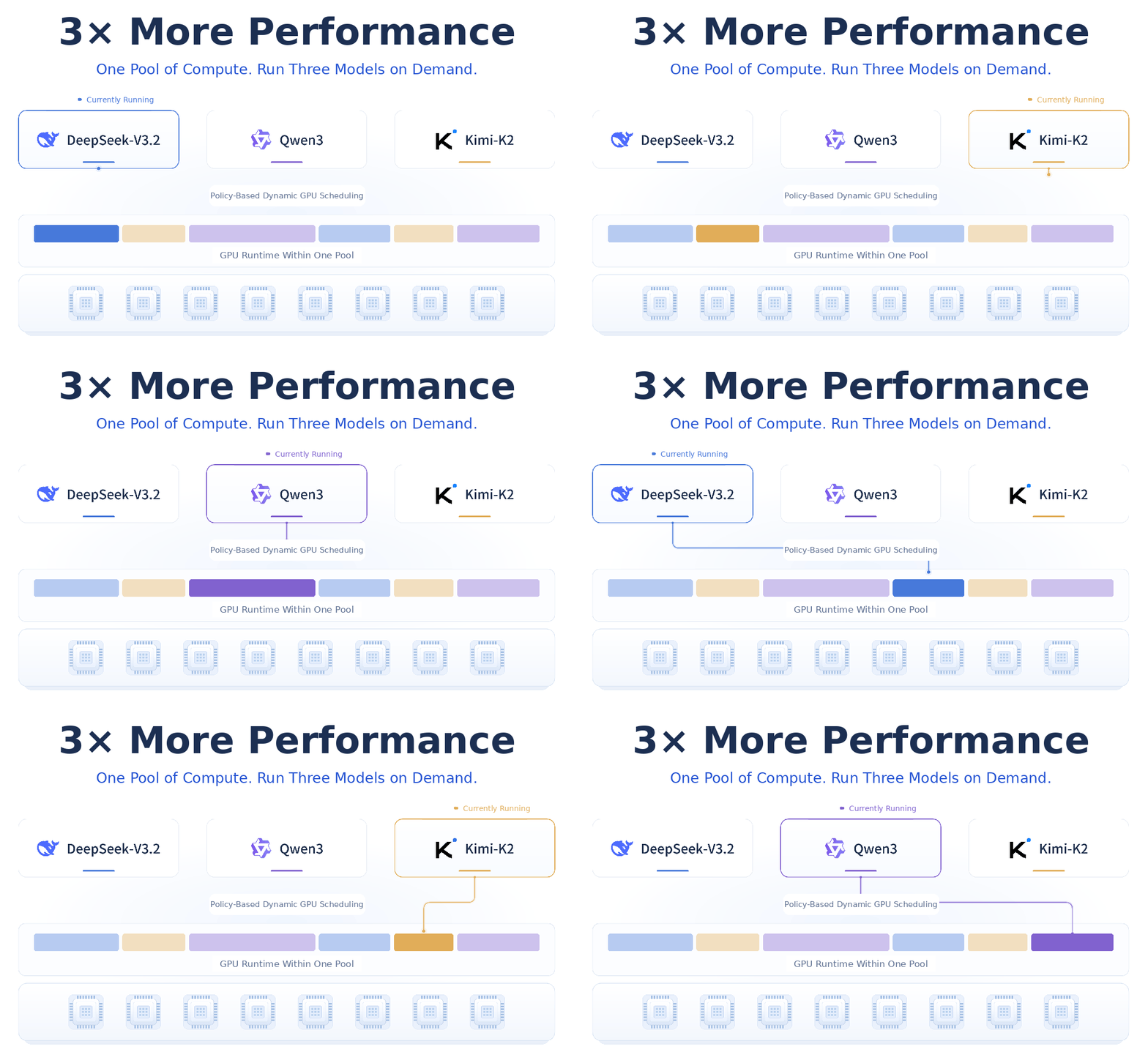
Multiple models taking turns on the same eight GPUs — time-sharing illustration
Take a pool with roughly 1 TB of total memory as an example. If all three models need the full pool, each would require its own dedicated allocation. With time-sharing, the three models use the same eight GPUs in sequence, and each run gets the full 1 TB of memory.
Through time-sharing, three large models take turns using the same eight GPUs, handling three workloads' GPU demand with about 1 TB of memory — a "3x oversubscription" effect.
02 / HANDOVER POLICIES
When to yield: set a separate policy for each model
Four yield policies
Even when another model is waiting, whether the current service should release resources depends on the work it's doing. GPUWorks offers four yield policies, configured on the deployment currently occupying the GPUs.
Auto handover when idle threshold is met and another deployment is waiting — timer shown at accelerated speed
There's an easily missed distinction here. "Yield on schedule" counts how long the model has been serving its current turn. If no other model requests resources, it can keep using the GPUs even after the full 120 seconds.
Timed plans
If the requirement is "hand over every weekday at 10 p.m.," add a sleep command to the timed plan, setting the day of week, time, and sleep level. A model that needs to stay resident during the day can be set to "never yield," yet still go to sleep at 10 p.m. as scheduled.
At handover time, the model may still be answering a user's question. Online Q&A wants users to receive complete replies, while urgent tasks may need the GPUs as soon as possible. To serve both needs, GPUWorks lets administrators preset how current requests are handled at deployment time.
Choose wait for completion and you can set a maximum wait time, giving the model a chance to finish the current question before yielding. Choose interrupt immediately and the model stops the current request and begins handover right away, so the waiting workload can take over sooner.
03 / SLEEP & WAKE
The GPUs are handed over — how quickly can a model come back?
If every time a model's turn comes around it has to reload its full set of weights from storage, those few-minute gaps are hard to make use of. That's why GPUWorks provides two sleep levels.
With L1 sleep, the inference engine is retained while the model weights move from GPU memory to host memory. Other models can use the freed GPUs, and when the original model regains its resources, the weights are loaded back into GPU memory from host memory.
When host memory is tight, L2 deep sleep moves the weights to disk instead.
In GPUWorks' own testing, on a server with eight H200 GPUs, all three models were deployed with eight-way tensor parallelism.
A traditional cold start requires restarting the inference engine, reloading weights from NFS, loading all eight GPUs' memory, then completing initialization and warm-up — service recovery takes 16 to 17.5 minutes. On the same hardware, L1 wake-up takes about 4 seconds. In this test, GPUWorks time-sharing with L1 wake-up improved model service recovery efficiency by more than 200× compared to a traditional NFS cold start.
Same 8×H200 pool — the ~4-second L1 wake-up is from this test; the cold-start flow is a sped-up illustration, not to scale
04 / USE CASES
Four typical GPU time-sharing scenarios
Scenario 1 — Model selection and testing
When choosing a model for the company's internal AI assistant, R&D needs DeepSeek, Qwen, and GLM to each answer the same set of questions and then compare them one by one. The three models can run in sequence — but if every model switch requires someone to stop the service and redeploy, a single test round can easily eat up time waiting on the machines.
During the testing window allocated to R&D, set all three candidate models to "yield on schedule," with a maximum service time of 120 seconds per turn, and choose "wait for the current request to complete" at handover.
That way, when DeepSeek's turn ends, it can finish the question at hand within the configured wait limit, then hand off to the queued Qwen, followed by GLM. The test program records each model's answers separately. What gets compared in the end are three sets of results on the same question set and the same hardware — one GPU pool is enough to complete the selection.
Scenario 2 — Online by day, batch at night
The eight-GPU pool from the opening has a clear handover moment. In GPUWorks, the administrator sets the online model to "never yield," then adds a sleep command in "timed plans," choosing the execution cycle, the time to release resources, and the sleep level. This way, even if a batch of documents is already queued, the online model keeps responding to queries.
At the scheduled time, the sleep command takes effect and the waiting batch-processing model takes over the pool.
The batch model can separately use "yield when idle." If some night has few documents and the job finishes early, once the idle threshold is met and another model is waiting, the remaining night hours can go to other tasks.
22:00 scheduled handover — night batch processing takes over the same GPU pool — scenario illustration
Scenario 3 — Priority access for critical workloads
Some requests can't wait until 10 p.m. An ordinary model might be sorting through a batch of materials while a critical-business Q&A request could come in at any moment. If you reserve a dedicated pool for the critical model, the GPUs sit idle whenever no one is asking questions; if you put it behind the whole batch, you might miss the response window.
Set the critical-business model to P0 priority with "yield when idle," and the ordinary model to P1 priority with "yield immediately." The ordinary workload runs as usual.
When a critical request arrives, the ordinary model wraps up according to its preset handover rules — for example, finishing the current item within the wait limit and saving the result — then yields the GPUs. The critical model takes over and answers the question first.
Once the critical model finishes and no new user request arrives for 60 seconds, and the material-sorting model is still waiting, the critical model hands the pool back under its idle-yield policy. The material-sorting model resumes with the next item.
Scenario 4 — Two backlogged queues alternating continuously
Offline data synthesis needs to generate a batch of Q&A samples, while document summarization also has a long queue of tasks. Both jobs have equal priority and can be processed item by item. Waiting for all samples to finish before starting summarization means the first summary would have to wait out the entire queue.
Instead, give both deployments the same priority and set both to "yield on schedule" with a maximum of 120 seconds per turn. As long as the other side still has tasks waiting, the current model serves a full turn, handles its in-flight request per the rules, and then yields to the other.
The synthesis program saves samples one by one and the summarization program saves results one by one, each resuming from its pending items in the next turn. Even if both queues never empty out, you still get both kinds of output steadily through the day. If one side finishes first, the other can keep running — no need to pause on schedule for a queue that's already cleared.
When deciding whether to buy more GPUs, first look at whether your workloads need the GPUs at the same time. If multiple models are simultaneously at full load, you still need to provision compute for the peak. If their GPU time can be staggered, GPUWorks time-sharing lets the same GPU pool take on more work.
05 / COMMUNITY
Join the community
GPUWorks' open-source journey has only just begun. Whether you're an AI developer, an infrastructure engineer, or a hardware vendor, you're welcome to join — try out different model and compute combinations, share your experience, report issues, and help us improve GPUWorks.
Try GPUWorks and join the open-source effort!