
01 / CONTEXT
GPUWorks' inference templates have supported MiniMax-H3-Image since Day 1! After deployment, users can generate and edit images directly in the Playground, or call it through the OpenAI-compatible /v1/images API.
We prepared 6 tiers for different entry points, and benchmarked each on the RTX 4090, A100 80GB, and H20-3e:
A single 24 GB RTX 4090 is enough, producing each 2048×2048 image in about 18 seconds.
Two A100s: about 3.3 seconds.
Four H20s: about 2.6 seconds.
MiniMax-H3-Image is MiniMax's open-source text-to-image and reference-image editing model, built on the MiniMax-H3 DiT:
Composition: a 33.1B DiT (BF16), a 33.4B Qwen3-VL text encoder (BF16), and a 0.58B image VAE (FP32) — roughly 135 GB of weights in total.
Every image uses a fixed 6 steps; the model has undergone CFG distillation.
Editing accepts up to 9 reference images.
The native canvas is 2048²-level, with a maximum output of 4736×3552.
Upstream is served by vLLM-Omni; see the vLLM recipe.
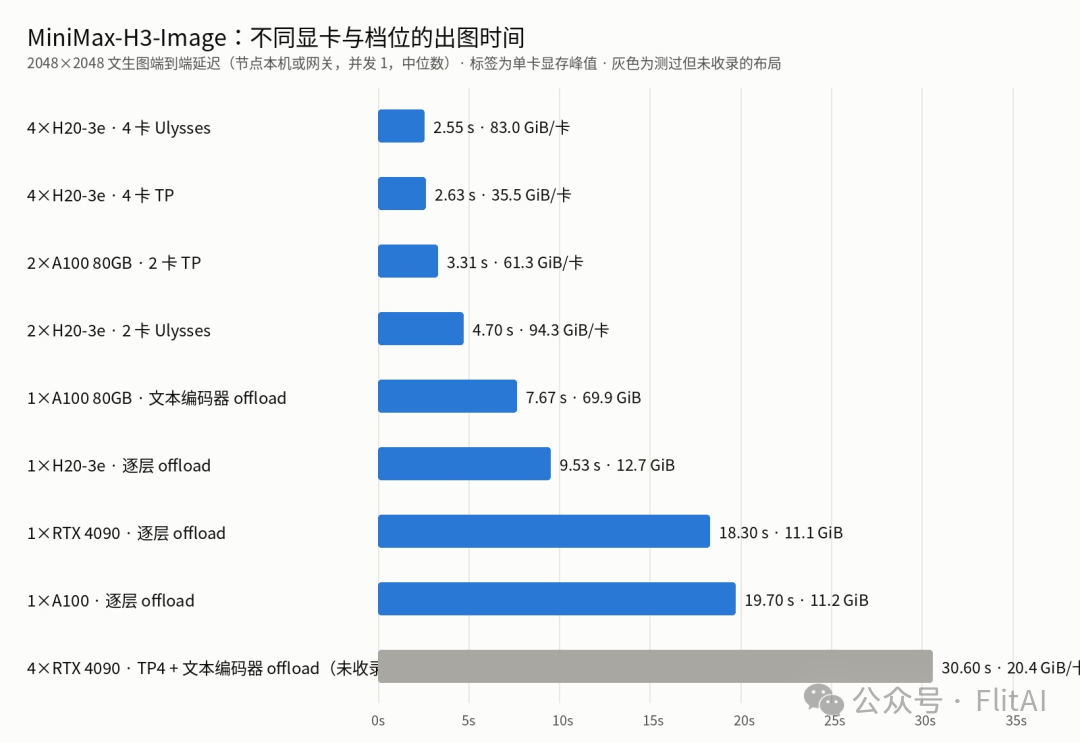
[MiniMax-H3-Image — generation time across different GPUs and tiers]
02 / TEST ENVIRONMENT
We used three hardware classes to cover scenarios from entry-level to high-performance. Two of them were cloud instances rented directly from GPUWorks' "Public Cloud" page — once rented, a one-click install of the agent brings them online as nodes within minutes.
Model: MiniMaxAI/MiniMax-H3-Image (68.7 GB) plus the text_encoder directory from MiniMaxAI/MiniMax-H3 (66.7 GB), both pinned to a fixed revision.
Image: vllm/vllm-omni:minimax-h3-image, released upstream with the model, including vLLM 0.33.0, vLLM-Omni, and PyTorch 2.14 + cu130.
03 / MODEL TEMPLATE
The template: two components, one rewrite
MiniMax-H3-Image's repository has no text encoder. Its model_index.json says "fetch the text_encoder from MiniMaxAI/MiniMax-H3 on Hugging Face." But GPUWorks starts the engine offline by default (HF_HUB_OFFLINE=1), and many nodes can't reach Hugging Face at all. So the template splits it into two components:
Download & mount: both components are downloaded and mounted into the container by the platform. Each component declares both a Hugging Face and a ModelScope source; nodes use whichever is faster to reach.
Pre-start rewrite: before engine startup, the template's pre-start script assembles a model directory under /tmp using symlinks and replaces the repo name in model_index.json with the mount path. vLLM-Omni sees a local directory and loads it directly, never touching the Hub.
Fixed revision: after release, the Hugging Face repo gained an additional set of diffusers-format weights, growing to about 204 GB — which vLLM-Omni doesn't use. The template pins the revision before those weights were added, and was verified file-by-file against the ModelScope version, with matching sha256 hashes.
04 / DEPLOYMENT OPTIONS
6 tiers
Tier parameters are taken from the vLLM recipe, then adjusted based on measured results for the supported GPU models and VRAM reservations:
"Applies to" is the template's matching condition; actually benchmarked GPU models are listed in the "Performance" section below.
The deployment form first filters tiers by GPU architecture. The screenshot below shows a cluster with RTX 4090s: three Ampere tiers show "chip match," while Hopper tiers fall into "incompatible tiers." After a node is selected, the platform runs a placement check against each tier's per-GPU VRAM minimum, so on a 4090 only "single GPU · per-layer offload" can be deployed:
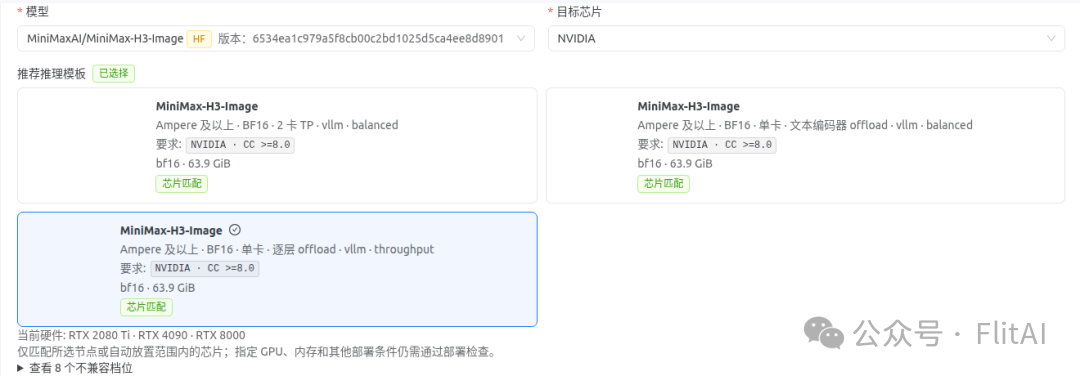
[Tier matching on RTX 4090]
When deploying on H20, the "Configuration assessment" on the right checks per-GPU VRAM against each tier's declared requirements, and the "Startup config preview" shows the command the platform actually runs. Parameters like --served-model-name and the port are injected by the platform:
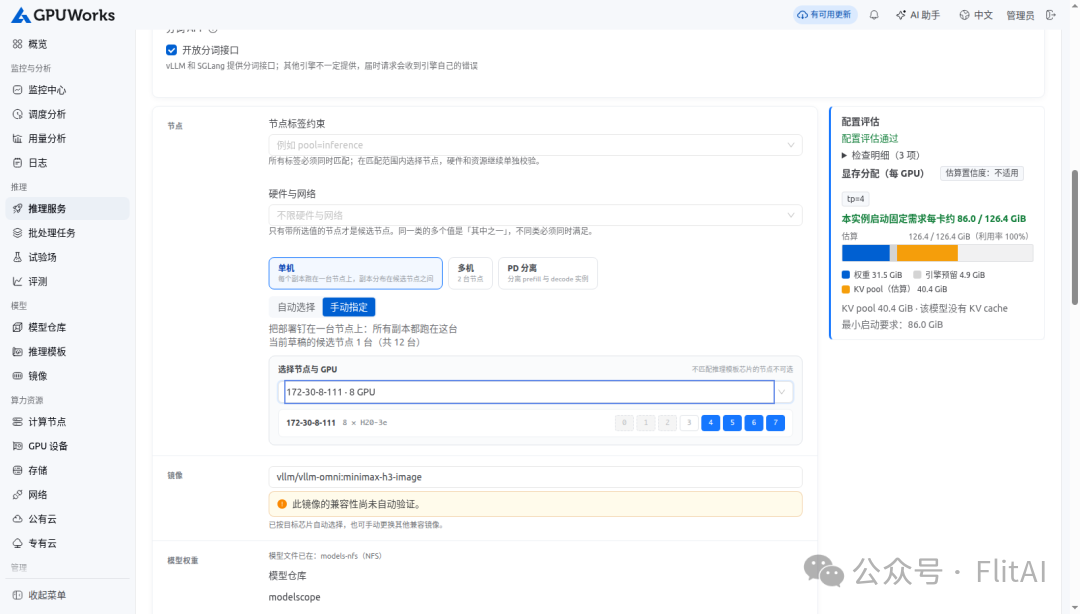
[Deployment form — GPU pinned, configuration assessment passed]
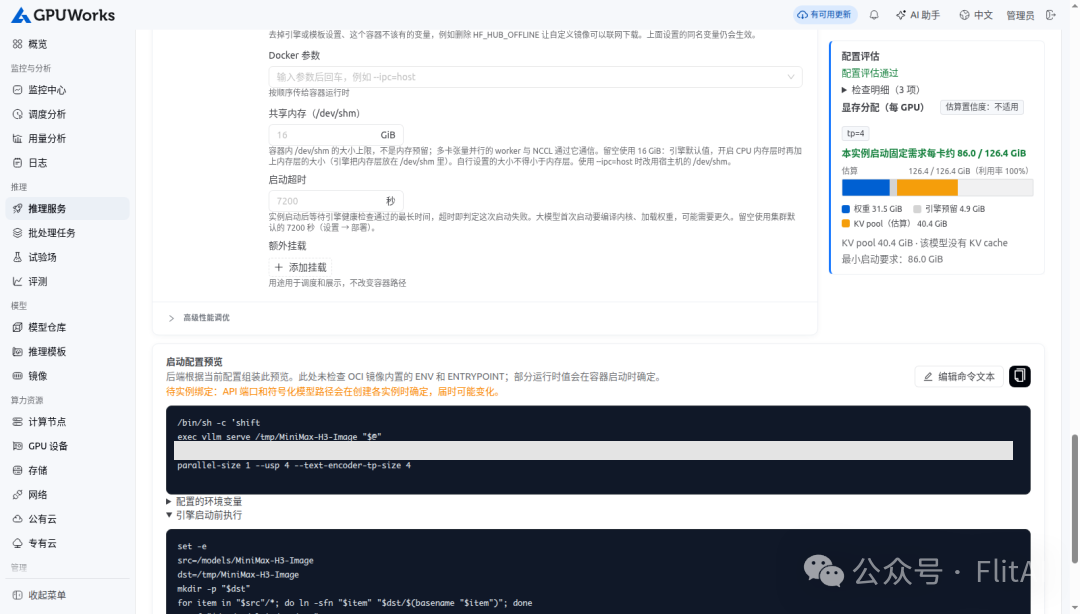
[Deployment form — startup command and engine pre-start script]
05 / IMAGE PLAYGROUND
Playground: text-to-image and editing
Once deployed, the model appears under "Playground → Images." The template declares both the "image generation" and "image editing" interfaces, switchable on the page.
Text-to-image: the prompt asks the model to render specific text, and it wrote both "GPUWorks" and the small bottom text correctly. On four H20s, click-to-image takes about 2.9 seconds:
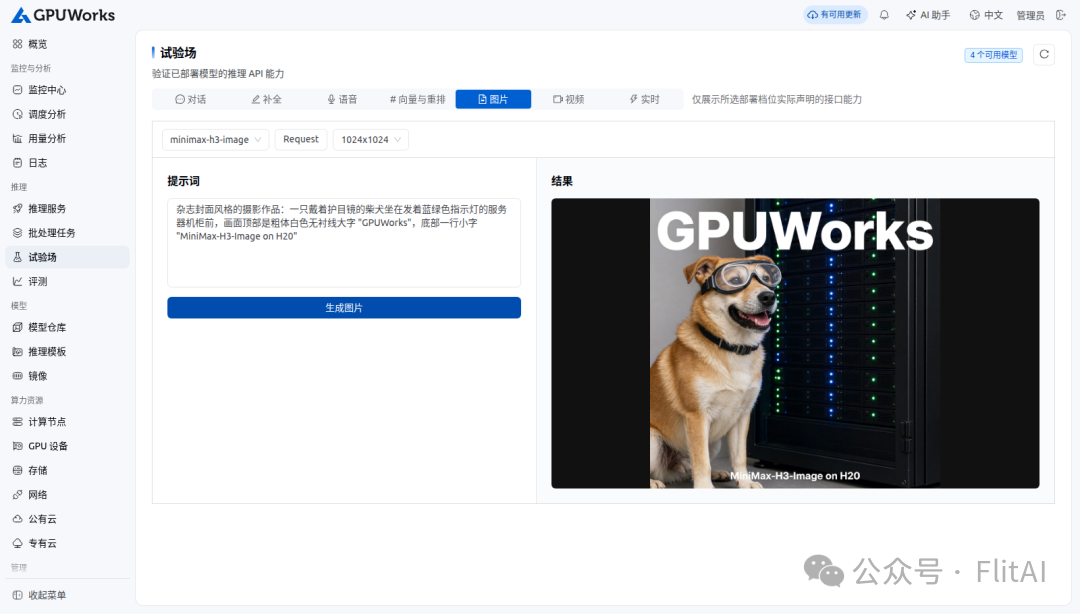
[Playground — text-to-image]
Image editing: upload a lighthouse photo, ask only to change the season to winter — the composition, lighthouse, and cabin are all preserved:
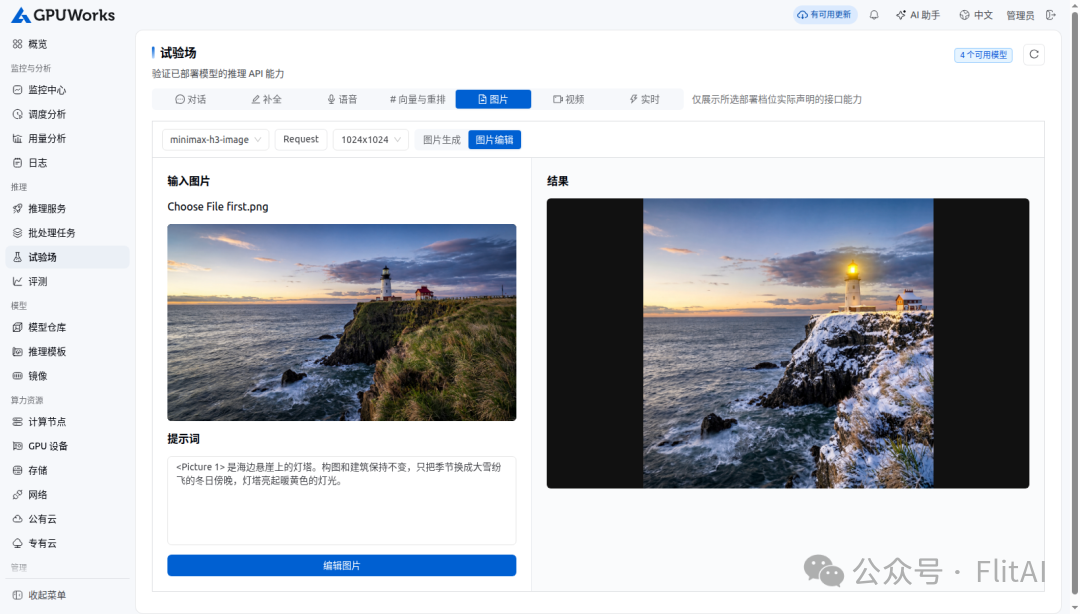
[Playground — reference-image editing]
Switch to a single RTX 4090 (per-layer offload) and the same page works. Below is an ink-wash painting with inscription generated on the 4090 — engine generation takes about 17 seconds, plus returning the image to the browser, click-to-image is about 30 seconds:
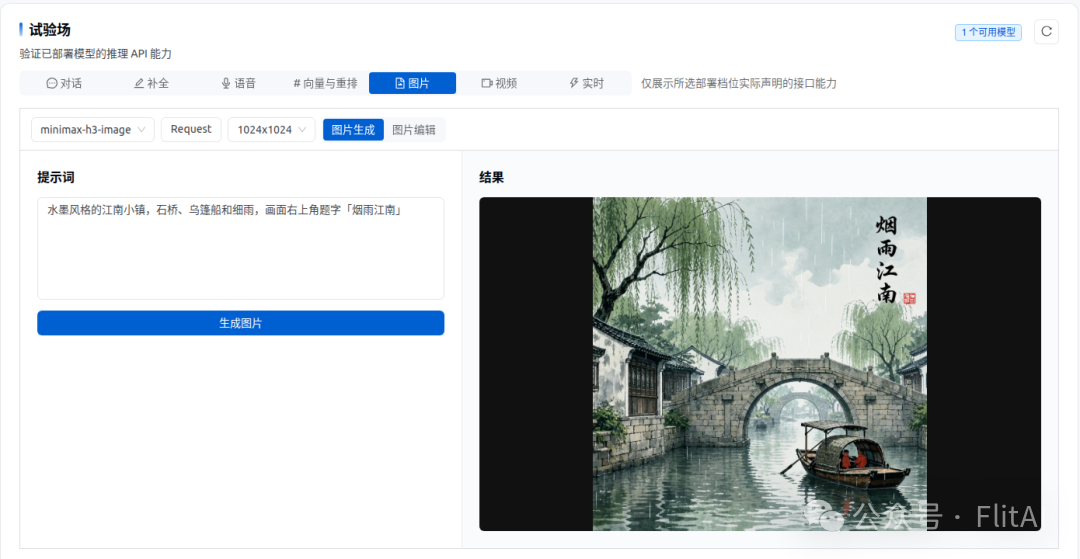
[Playground — text-to-image on RTX 4090]
The same requests can also go through the platform's OpenAI-compatible gateway, using a platform-issued API token:
Some generated originals (shown scaled down). 2720×1536 text-to-image:
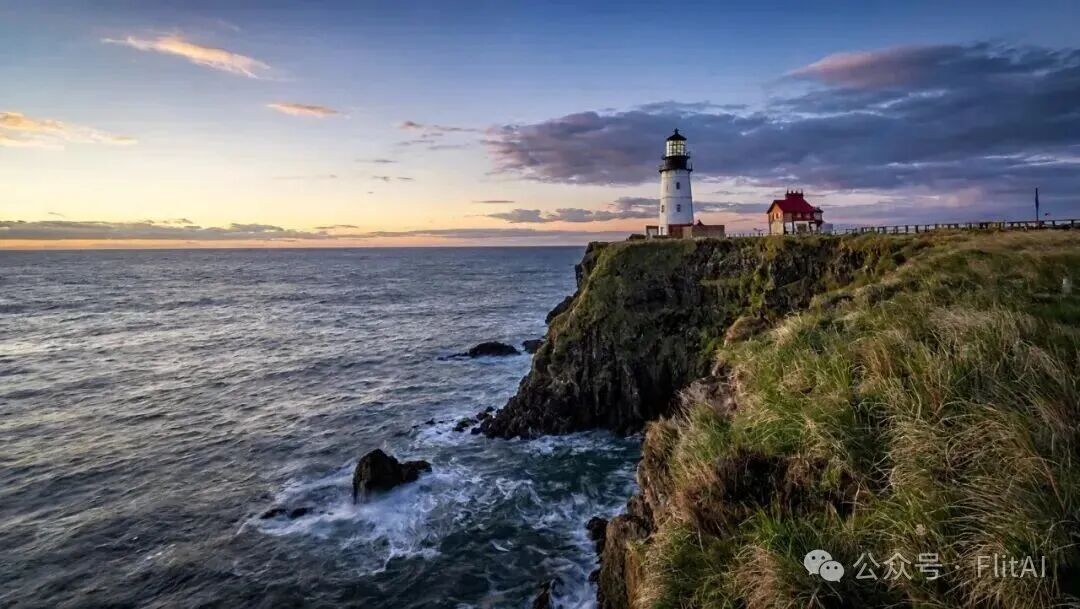
[2720×1536 text-to-image]
Using the image above as reference, 2720×1536 edit:

[2720×1536 reference-image editing]
1536×2720 vertical poster:
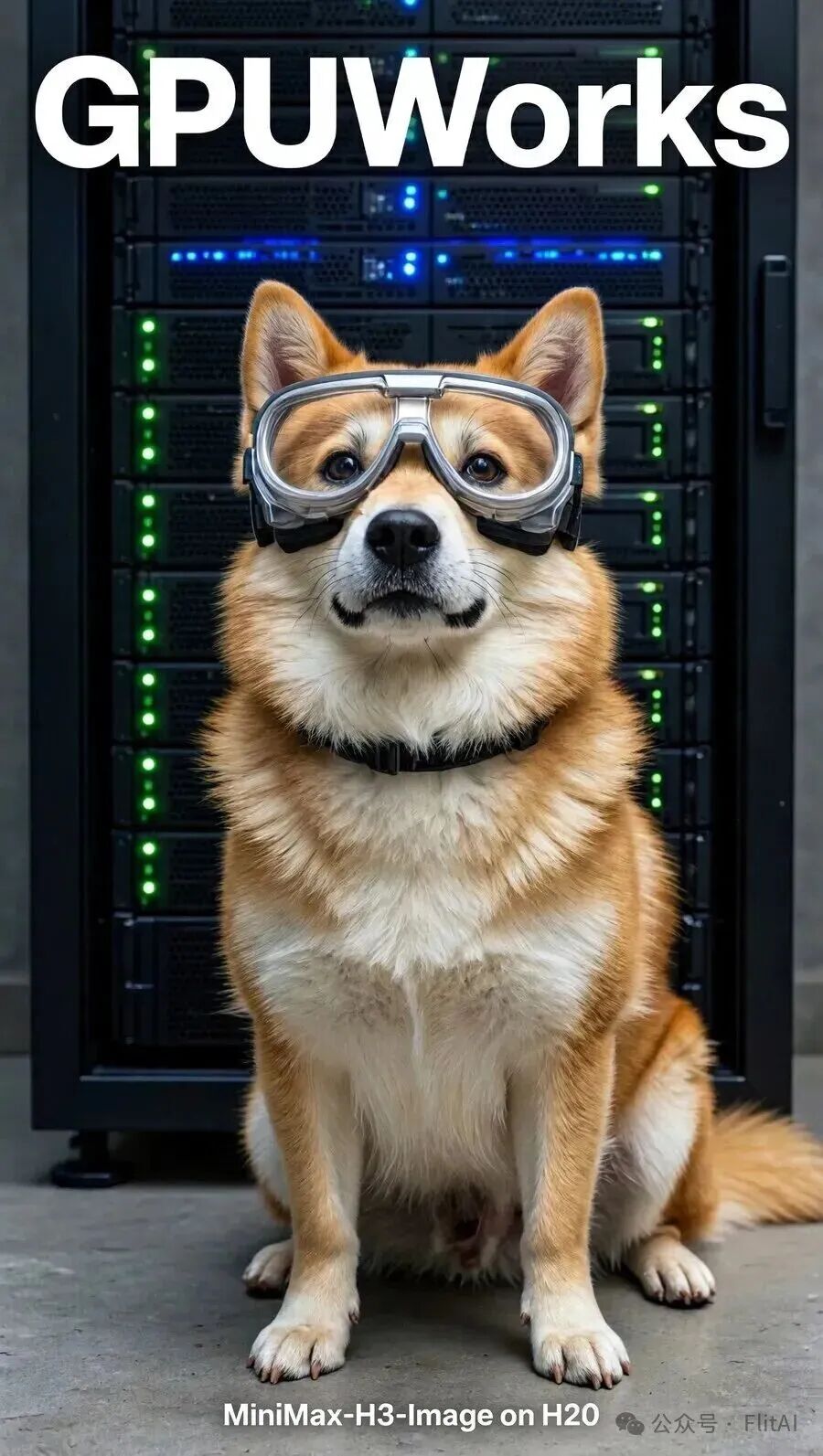
[1536×2720 vertical poster]
06 / PERFORMANCE
Performance: across GPUs and tiers
Load testing used closed-loop requests at fixed concurrency, sampling nvidia-smi every 0.5 seconds to record VRAM and power draw.
H20 requests were sent through the platform gateway; cloud-instance requests hit the engine directly on the node, to rule out cross-region network effects.
The platform's "Evaluation" currently only benchmarks the chat interface, so the image interface used a custom script, included with the data in the evidence directory.
All requests succeeded. The table shows median end-to-end latency at concurrency 1:
For the edit column: H20 used a 2720×1536 reference, while A100 and 4090 used a 2048×2048 reference, so the two are not directly comparable.
A few takeaways from the data:
1024² is just as fast as 2048². Requests smaller than 2048² are first generated on a 2048² canvas, then downscaled — sharper images cost no extra time.
Concurrency doesn't increase throughput. 4-GPU Ulysses holds 0.41 images/s at concurrency 1, 2, 4, and 8; latency grows linearly with concurrency, reaching 19.3 s at concurrency 8. The engine processes one image at a time, and extra requests simply queue. To raise throughput, deploy more replicas.
4-GPU TP is the better deal on H20. Only 3% slower than Ulysses (2.63 s vs. 2.55 s), while per-GPU VRAM drops from 83 GiB to 35.5 GiB — the saved memory can go to other services.
A single 4090 works. Per-layer offload places both the DiT and the text encoder in pinned host memory, copying each layer to the GPU as needed, so VRAM needs only 11 GiB. The cost is host memory: roughly 124 GiB.
Per-layer offload speed depends on PCIe, not compute. Same tier: H20 (PCIe 5) at 9.5 s, while the 4090 and A100 (PCIe 4) run 18–20 s.
Consumer cards aren't suited to multi-GPU layouts. 4090s have no NVLink, so cross-GPU traffic goes through the host. We also tried two multi-GPU layouts: 4-GPU TP with text-encoder offload at 30.6 s/image, and 2-GPU Ulysses with per-layer offload at 110 s/image — both slower than a single card, so they weren't added to the template. To raise throughput on 4090s, deploy one single-GPU replica per card, budgeting about 124 GiB of host RAM per replica.
Two A100s are already fast. 2-GPU TP at 3.3 s/image, not far off four H20s. With only one 80 GB card, text-encoder offload runs 7.7 s/image.
Same seed, different tiers, nearly identical output. Below are images generated with the same seed on 4-GPU Ulysses, 4-GPU TP, 2-GPU Ulysses, and per-layer offload:
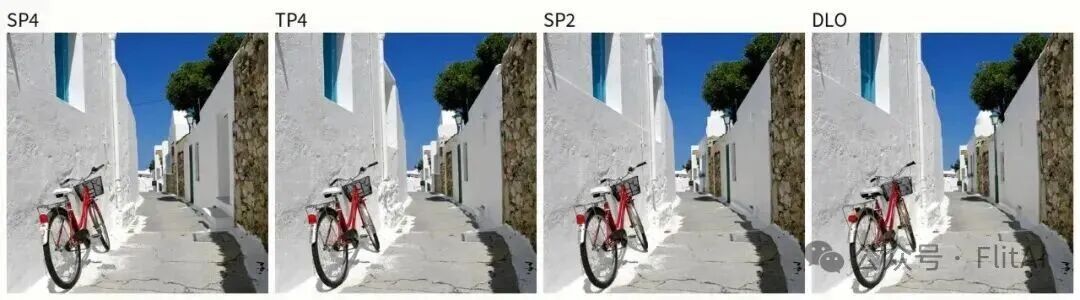
[Same seed across four tiers]
VRAM reservation: every tier declares a VRAM reservation above its measured peak. The platform computes available VRAM for the omni engine as 90% of the card — an 80 GB card counts as 72 GiB — so single-GPU text-encoder offload sets its reservation at 71.5 GiB, just fitting.
Startup time: four H20s cold-start from shared storage in about 4 minutes, or about 1.5 minutes when the weights are in page cache. The two offload tiers must first move weights into pinned memory, taking 5–8 minutes.
07 / OBSERVABILITY
No need to deploy Prometheus or Grafana separately — the gateway tracks every request itself.
The service monitoring page shows request count, end-to-end latency, concurrency curves, and gateway overhead (6 ms) during the load test, with live container logs scrolling below. vLLM-Omni prints an OmniTiming line for every image processed, recording total and per-stage time:
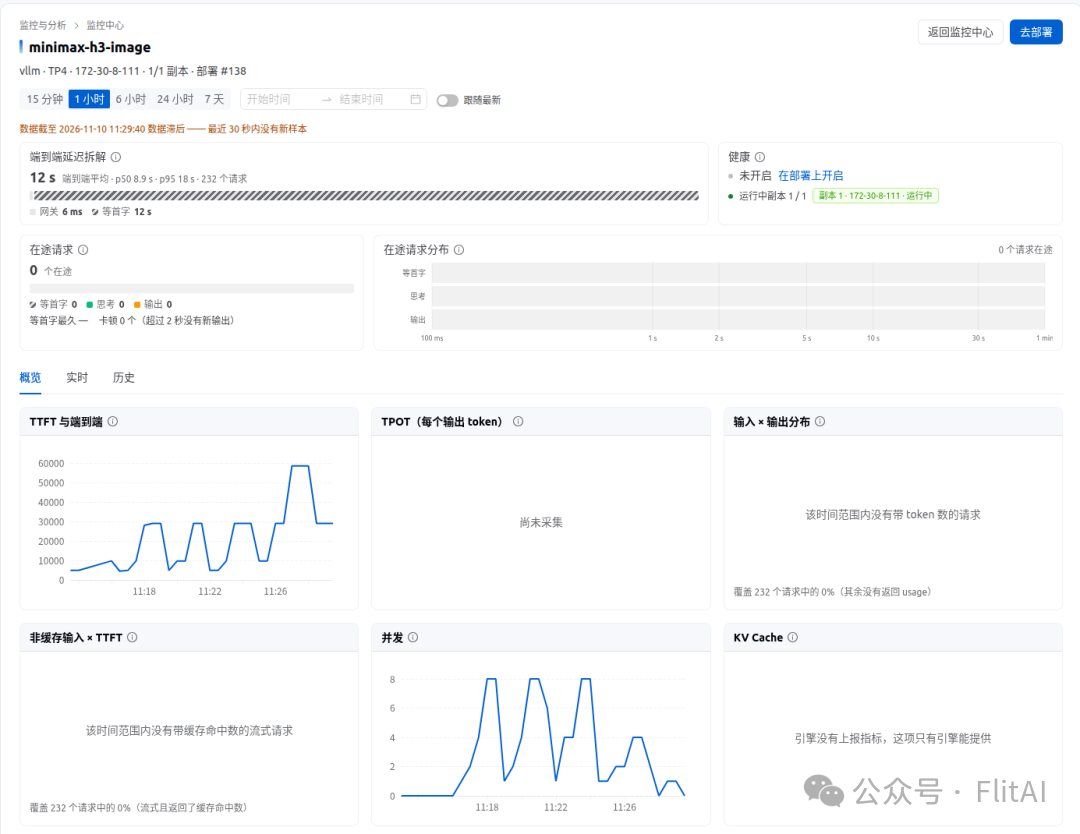
[Service monitoring — end-to-end latency and concurrency of minimax-h3-image]
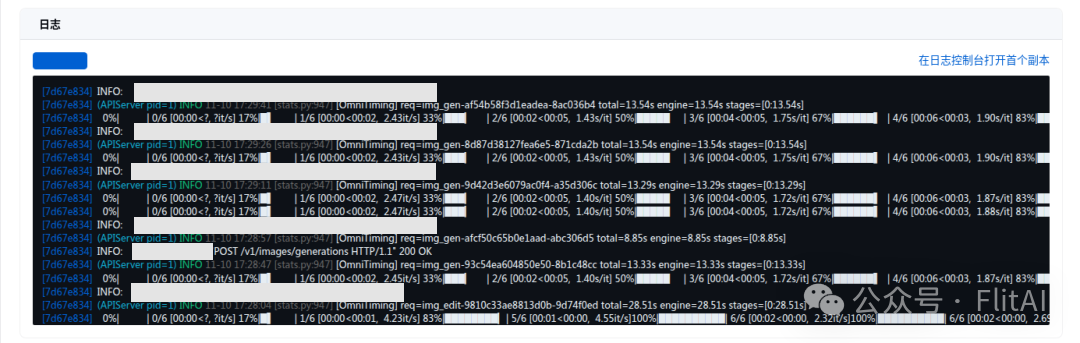
[Service monitoring — OmniTiming in live logs]
The deployment detail page shows the same stats under "Deployment metrics," along with the GPU hosting each instance and the image digest:
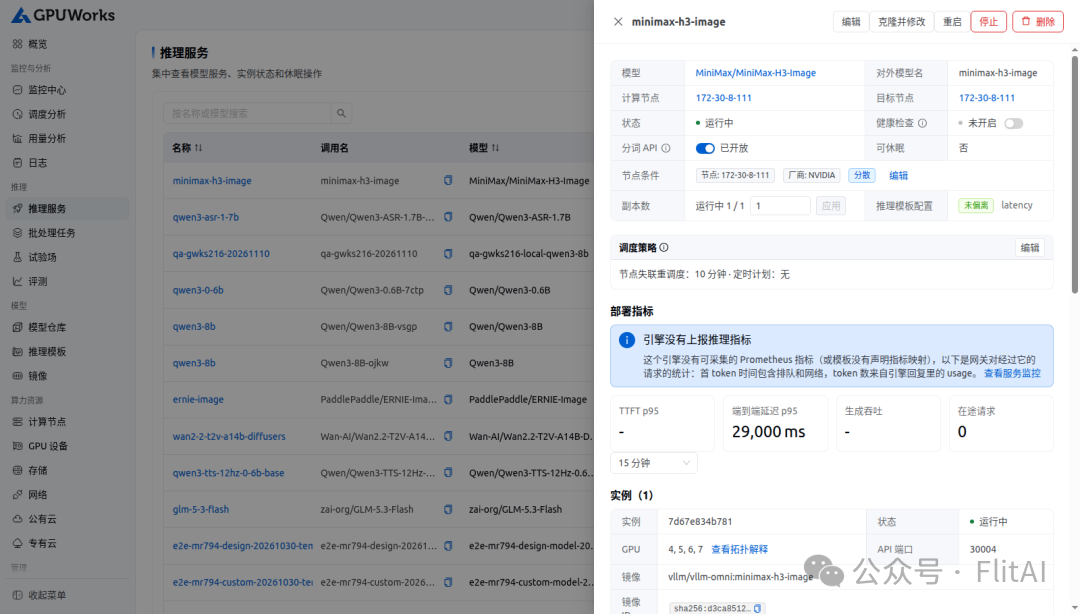
[Deployment details]
08 / PLATFORM UPDATES
While integrating this model, we also made several behavior improvements in the nightly version:
Two other observations:
A 2720×1536 edit under a certain seed output over-sharpened results and failed to change the season; a different seed worked fine. The cause is still being confirmed by collecting samples.
In service monitoring, image-request latency is currently logged under "time to first token"; this will later be changed to display per image request.
09 / FIELD NOTES
Use the GPUWorks Nightly version for a better experience and support.
Pick your tier by the card you have:
One card ≥ 24 GB (4090, A100 40G, L40S…): single-GPU per-layer offload, leaving about 124 GiB of host RAM.
One 80 GB card: single-GPU text-encoder offload.
Two 80 GB cards: 2-GPU TP.
Four 141 GB cards (H20, H200): 4-GPU TP.
Consumer cards: avoid multi-GPU layouts.
Request native canvas sizes:
2048x2048, 2720x1536, 1536x2720, 2368x1760, 2496x1664, 3136x1344. Requesting smaller sizes saves no time — it only adds a resize step. For editing, use these same sizes for the reference image to get the best alignment.
Scale throughput with replicas, not concurrency:
The engine processes one image at a time. Raise throughput by adding replicas; the platform gateway distributes requests across them.
Verify large weights before handing them to the platform:
Existing weight directories aren't always reliable. We once found a MiniMax-H3 on shared storage where two tokenizer files differed from upstream. Verify against the upstream-published sha256 first, then hand it to the platform.
Once upstream updates, we'll release a GPUWorks vLLM-Omni runner image that includes MiniMax-H3-Image, replacing the launch image and enabling fully offline deployment. You're welcome to join our community WeChat group to discuss and exchange ideas!
10 / COMMUNITY
GPUWorks' open-source journey is just beginning. Whether you're an AI developer, an infrastructure engineer, or a hardware vendor, you're welcome to join — try different model-and-compute combinations, share your experience, report issues, and help us improve GPUWorks together.
Experience GPUWorks and join the open-source effort!